

Focusplan


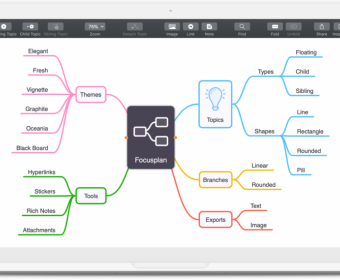
Open Focusplan when you need to turn scattered thoughts into a working plan. Start with a blank canvas, drop a central topic, and branch out in seconds. Add child items as ideas appear, drag to reorder, and collapse sections to keep the view clean. Attach notes to any topic to capture references, examples, or next steps. Pick a template to set a consistent look, then refine details with the side controls for colors, typography, shapes, and line styles. Use the built-in icon set to label status or category at a glance. When your structure is solid, select and copy text out to move effortlessly into drafting.
For writing and content creation, sketch headlines, key points, and supporting details before you ever open a document editor. Group related concepts, reorder narrative flow, and color-code segments like intro, body, and conclusion. Add notes with quotes, links, and calls to action so nothing gets lost. If you already have a bulleted outline, paste it in—Focusplan converts structured text into a map automatically. Apply a theme for polished consistency, then fine-tune single elements as needed without breaking the overall style. When you’re ready, share the map with an editor or collaborator to align on structure before writing.
Use it to plan projects and meetings with the same speed. Break a goal into phases, then into tasks, and mark priorities with color and icons. Store owners, estimates, and constraints inside topic notes so all context travels with the plan. During a workshop, capture decisions as branches under the agenda, highlight risks with clear visual tags, and fold finished sections to focus the group. Afterward, tidy the styling and share a read-only version or export a snapshot to distribute with minutes and action items.
Developers, researchers, and students can map complex topics without friction. Outline features, architectures, experiments, or study guides in a way that stays navigable as it grows. Import an existing outline to jump-start, then rearrange and reframe until the structure makes sense. Use templates to keep teams consistent, and annotate each node with definitions, acceptance criteria, or citations. Customize the look to match your team’s visual system, then send the map to teammates or present on screen for quick alignment.
Focusplan
$1.99 per month
Mind Maps
Creative Stickers and Stunning Themes
Note Taking
Import and Export MindMap
Share with Friends


Comments